
Mazda 3 Service Manual: Trunk Lid Key Cylinder Removal/Installation
1. Disconnect the negative battery cable..
2. Remove the trunk lid trim..
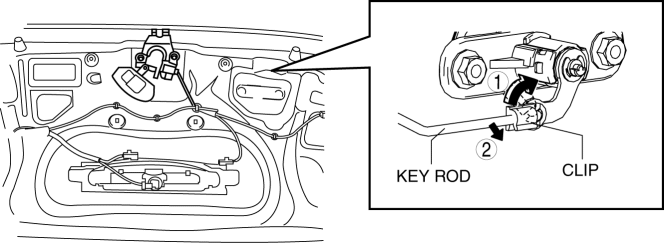
3. Lift the clip in the direction of the arrow (1), and pull out the key rod in the direction of the arrow (2).
4. Remove the nuts.
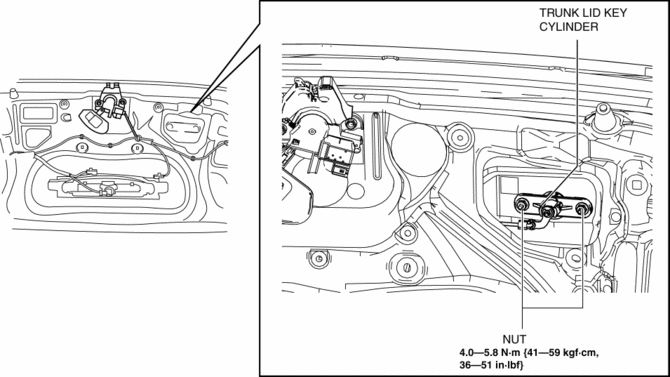
5. Remove the trunk lid key cylinder.
6. Install in the reverse order of removal.
 Front Door Key Cylinder Switch Inspection
1. To access the glass installation bolt, position the front door glass so that
the distance from the top of the front door glass to the upper part of the front
beltline molding is approx. 80 mm { ...
 Ignition Switch Inspection [Without Advanced Keyless Entry And Push Button Start
System]
Ignition Switch Inspection [Without Advanced Keyless Entry And Push Button Start
System]
1. Disconnect the negative battery cable..
2. Remove the column cover..
3. Remove the ignition switch..
4. Verify that the continuity between the ignition switch terminals is as indicated
in t ...
Other materials:
Rear Buckle Removal/Installation
Rear Buckle (RH) and Rear Buckle (Center)
1. Remove the rear seat cushion..
2. Remove the bolt.
3. Remove the rear buckle (RH) and rear buckle (center).
4. Install in the reverse order of removal.
Rear Buckle (LH)
1. When removing or installing the rear buckle (LH), refer to the rear ...
Air Intake Actuator Inspection [Full Auto Air Conditioner]
1. Connect battery positive voltage to air intake actuator terminal B (or C),
connect terminal C (or B) to ground, and then verify that the air intake actuator
operates as shown in the table.
If the operation condition is not normal, replace the air intake actuator.
...
Customer Assistance
(Puerto Rico)
Your complete and permanent satisfaction is our business. That is why all
Authorized Mazda
Dealers have the knowledge and the tools to keep your Mazda vehicle in top
condition.
If you have any questions or recommendations for improvement regarding the
service of
your Mazda vehicle or serv ...
