
Mazda 3 Service Manual: Rear Center Speaker Inspection
1. Disconnect the negative battery cable..
2. Remove the following parts:
a. Rear seat cushion.
b. Rear scuff plate.
c. Tire house trim.
d. C-pillar trim.
e. Rear package trim.
f. Rear center speaker.
3. Verify the resistance between the rear center speaker terminals.
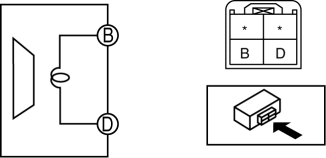
-
If not within the specification, replace the rear center speaker.
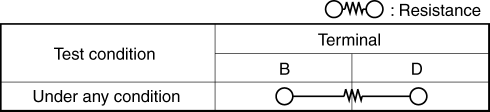
-
Resistance
-
0.9—1.1 ohms
 Keyless Antenna Removal/Installation
Interior, Front
1. Disconnect the negative battery cable..
2. Remove the following parts:
a. Upper panel.
b. Shift knob (MTX).
c. Selector lever knob (ATX).
d. Shift panel.
e. Side wall. ...
 Rear Center Speaker Removal/Installation
1. Disconnect the negative battery cable..
2. Remove the following parts:
a. Rear seat cushion.
b. Rear scuff plate.
c. Tire house trim.
d. C-pillar trim.
e. Rear package trim.
3. Remove ...
Other materials:
HomeLink Wireless Control
System*
NOTE
HomeLink and HomeLink house are
registered trademarks of Johnson
Controls.
The HomeLink system replaces up to
3 hand-held transmitters with a single
built-in component in the auto-dimming
mirror. Pressing the HomeLink button on
the auto-dimming mirror activates garage
doors, gates and ...
How to use AUX mode (Type B)
Select the icon on the home screen to display the Entertainment screen.
Select to switch to the AUX mode. The following icons are
displayed in the lower
part of the center display.
Icon
Function
Displays the Entertainment menu. Use to switch to a diffe ...
Security Setting (Type A)
If a passcode is set, the system cannot be
activated unless the passcode is input.
NOTE
Do this function only when parked. It is
too distracting to attempt while driving
and you may make too many errors to be
effective.
Passcode setting
Press the pick-up button or talk button
with a sho ...
