
Mazda 3 Service Manual: Keyless Antenna Removal/Installation
Interior, Front
1. Disconnect the negative battery cable..
2. Remove the following parts:
a. Upper panel.
b. Shift knob (MTX).
c. Selector lever knob (ATX).
d. Shift panel.
e. Side wall.
f. Center panel.
g. Audio unit.
h. Rear heat duct (1).
3. Disconnect the connector.
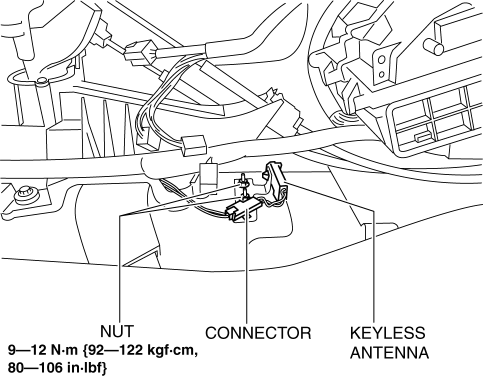
4. Remove the nuts.
5. Remove the keyless antenna.
6. Install in the reverse order of removal.
Interior, Rear
1. Disconnect the negative battery cable..
2. Remove the rear seat cushion..
3. Disconnect the connector.
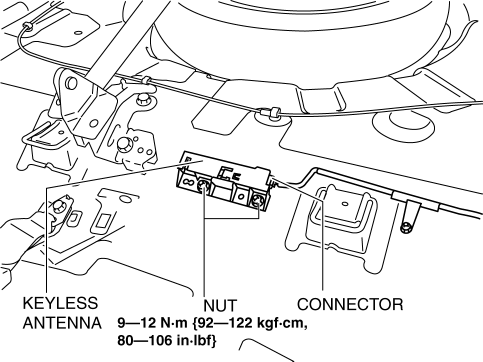
4. Remove the nuts.
5. Remove the keyless antenna.
6. Install in the reverse order of removal.
Exterior, Rear
1. Disconnect the negative battery cable..
2. Remove the rear combination light..
3. Remove the rear bumper..
4. Remove the nuts.
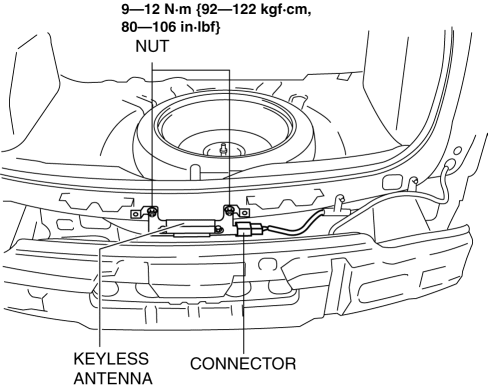
5. Disconnect the connector.
6. Remove the keyless antenna.
7. Install in the reverse order of removal.
Exterior, LF/RF
NOTE:
-
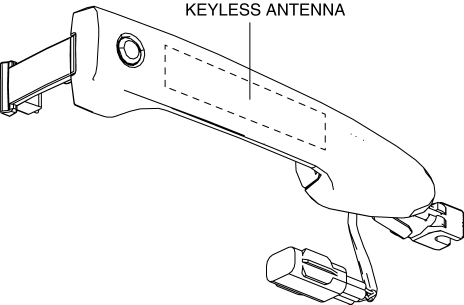
The keyless antenna (vehicle exterior, LF/RF) is built into the front outer handle..
 Installation Of Radio System
The control modules and control unit have been designed with sufficient attention
to radio wave disturbances from the outside. However, observe the following precautions
when installing the radio ...
 Rear Center Speaker Inspection
1. Disconnect the negative battery cable..
2. Remove the following parts:
a. Rear seat cushion.
b. Rear scuff plate.
c. Tire house trim.
d. C-pillar trim.
e. Rear package trim.
f. Rear c ...
Other materials:
Neutral Switch Removal/Installation [C66 M R]
1. Remove the battery cover..
2. Disconnect the negative battery cable..
3. Remove the aerodynamic under cover No.2..
4. Install in the reverse order of removal.
5. Remove in the order indicated in the table.
6. Install in the reverse order of removal.
1
Neutr ...
Electric Variable Valve Timing Actuator Inspection [Skyactiv G 2.0]
WARNING:
A hot engine can cause severe burns. Turn off the engine and wait until it
is cool before servicing.
CAUTION:
Do not disassemble the electric variable valve timing actuator because it
is a precision unit.
1. Remove the battery cover..
2. Disconnect the ne ...
Front Door Hinge Removal/Installation
1. Disconnect the negative battery cable..
2. Remove the following parts:
a. Front bumper.
b. Front combination light.
c. Front fender molding.
d. Side step molding.
e. Front fender panel.
f. Front door.
3. Remove in the order indicated in the table.
1
B ...
