
Mazda 3 Service Manual: Side Turn Light Inspection
Side turn light illumination inspection
1. Disconnect the negative battery cable..
2. Remove the outer mirror glass..
3. Remove the outer mirror garnish..
4. Remove the side turn light..
5. Connect the battery voltage as shown in the figure.
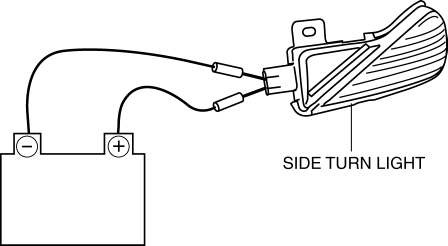
-
If the side turn light does illuminate, replace it.
-
If the side turn light illuminate, inspect the short-code.
Short-code inspection
1. Remove the inner garnish..
2. Remove the front door trim..
3. Disconnect the power outer mirror connector..
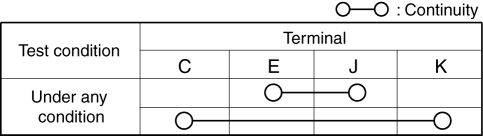
4. Verify that the continuity between side turn light terminals is as indicated in the table.
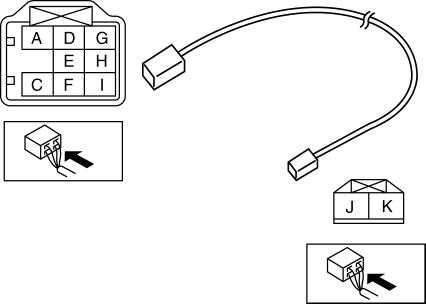
5. If not as indicated in the table, replace the power outer mirror.
 Rear Turn Light Bulb Removal/Installation
4SD
1. Disconnect the negative battery cable..
2. Remove the following parts:
a. Trunk mat.
b. Trunk board.
c. Trunk end trim.
3. Partially peel back the trunk side trim..
4. Remove in th ...
 Side Turn Light Removal/Installation
1. Disconnect the negative battery cable..
2. Remove the outer mirror glass..
3. Remove the outer mirror garnish..
4. Remove the screw.
5. Disconnect the connector.
6. Remove the side tu ...
Other materials:
Auxiliary Jack Removal/Installation
1. Disconnect the negative battery cable..
2. Remove the following parts:
a. Upper panel.
b. Shift lever knob (MTX).
c. Selector lever knob (ATX).
d. Shift panel.
e. Side wall.
f. Console.
3. Remove the auxiliary jack in the direction of the arrow (2) shown in the figure
while pres ...
Wastegate Control Solenoid Valve Inspection [Mzr 2.3 Disi Turbo]
Airflow Inspection
1. Remove the battery cover..
2. Disconnect the negative battery cable..
3. Remove the wastegate control solenoid valve..
4. Inspect the airflow between the ports under the following conditions.
If not as specified, replace the wastegate control solenoid val ...
Rear Trailing Link Removal/Installation
CAUTION:
Performing the following procedures without first removing the ABS wheel-speed
sensor may possibly cause an open circuit in the wiring harness if it is pulled
by mistake. Before performing the following procedures, disconnect the ABS wheel-speed
sensor wiring harness connec ...
