
Mazda 3 Service Manual: Cowl Panel Removal/Installation
1. Disconnect th negative battery cable..
2. Remove the windshield wiper arm and blade..
3. Remove the front fender molding..
4. Remove the cowl grille..
5. Remove the washer hose grommet from the cowl panel and disconnect the front washer hose.
6. Remove the windshield wiper motor..
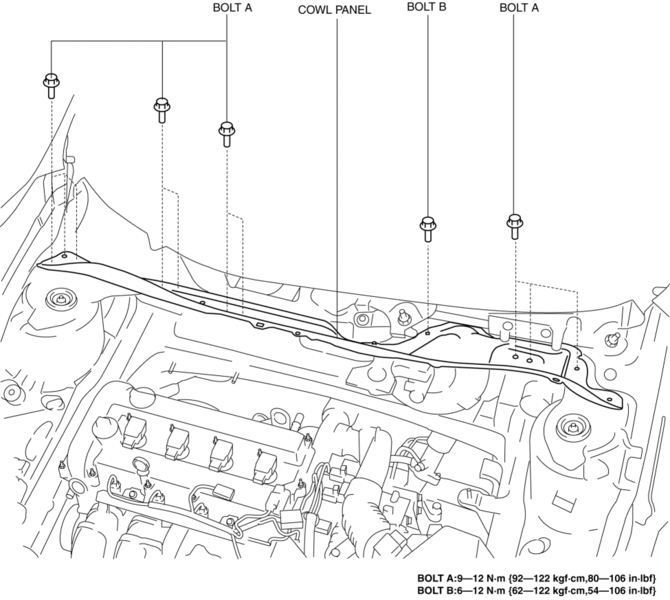
7. Remove the bolts A and bolt B.
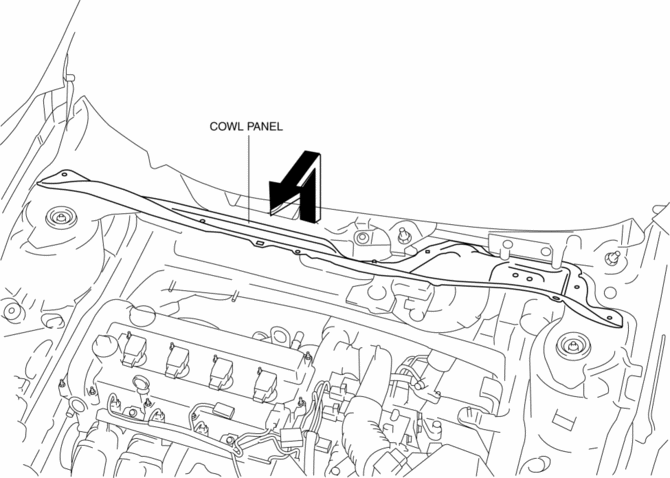
8. Remove the cowl panel in the direction of the arrow shown in the figure.
9. Install in the reverse order of removal.
 Cowl Grille Removal/Installation
1. Remove the windshield wiper arm and blade..
2. Remove the fastener A.
3. Pull the front fender molding in the direction of the arrow shown in the figure
and remove it while remove the tab B a ...
 Energy Absorbing Form Removal/Installation
1. Disconnect the negative battery cable..
2. Remove the rear combination light..
3. Remove the rear bumper..
4. Remove the fasteners.
5. Remove the rear energy-absorbing form.
6. Instal ...
Other materials:
Vehicle load limits
The Subaru Solterra vehicle load limits define the maximum allowable
weight parameters, including total load capacity, seating capacity, TWR (Trailer
Weight Rating), and cargo capacity, all of which must be respected for safe operation.
Understanding and correctly applying these limits in the S ...
Heated steering wheel/seat heaters/seat ventilators/ radiant heaters
Heated steering wheel
In the Subaru Solterra, the heated steering wheel gently warms the grip area,
enhancing driver comfort during cold weather and improving overall driving experience.
Seat heaters
The seat heaters in the Subaru Solterra provide efficient warmth to the seat
surfac ...
Air Intake Actuator Inspection [Manual Air Conditioner]
1. Connect battery positive voltage to air intake actuator terminal B (or C),
connect terminal C (or B) to ground, and then verify that the air intake actuator
operates as shown in the table.
If the operation condition is not normal, replace the air intake actuator.
...
