
Mazda 3 Service Manual: Front Fender Panel Removal/Installation
1. Disconnect the negative battery cable..
2. Remove the following parts:
a. Front bumper.
b. Front combination light.
c. Front fender molding.
d. Side step molding.
3. Remove fasteners and bolts, then remove the front fender panel in the direction of the arrow shown in the figure.
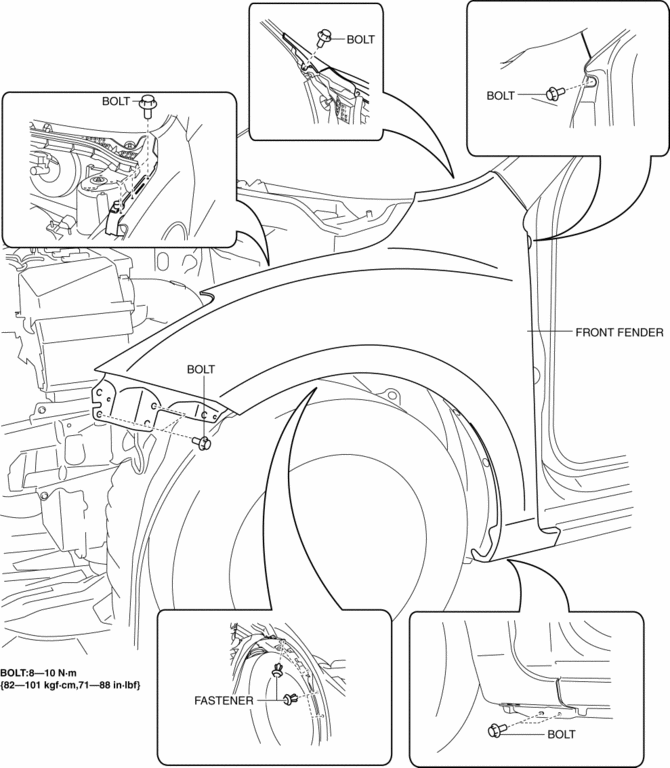
4. Install in the reverse order of removal.
5. Adjust the headlight aiming..
 Front Bumper Removal/Installation
1. Disconnect the negative battery cable..
2. Remove the screw A and fasteners B.
3. Remove the screws C.
4. Remove the bolts D.
5. Remove the fasteners E, screw F and fastener G. ...
 Front Mudguard Removal/Installation
1. Remove screw A, fasteners B, screws C, fasteners D, and E.
2. Remove the front mudguard in the direction of the arrow shown in the figure.
3. Install in the reverse order of removal. ...
Other materials:
Emission Control System
This vehicle is equipped with an emission control system (the catalytic
converter is
part of this system) that enables the vehicle to comply with existing exhaust
emissions
requirements.
WARNING
Never park over or near anything fl ammable:
Parking over or near anything fl ammable ...
Power Brake Unit Removal/Installation [Mzr 2.0, Skyactiv G 2.0, Mzr 2.5]
CAUTION:
Once the brake switch clearance has automatically been adjusted, it cannot
be adjusted again. Therefore, replace the switch with a new one when replacing
the power brake unit or performing any procedure that changes the pedal stroke.
Secure the steering wheel using tap ...
Child Restraint Seat Anchor Removal/Installation
4SD
1. Remove the cover.
2. Remove the bolt and child-restraint seat anchor.
3. Install in the reverse order of removal.
5HB
1. Remove the trunk end trim..
2. Remove the bolt and child-restraint seat anchor.
3. Install in the reverse order of removal. ...
