
Mazda 3 Owners Manual: Opening the Hood
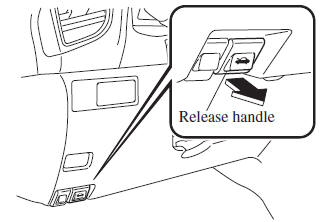
- With the vehicle parked, pull the release handle to unlock the hood.
- Insert your hand into the hood opening, slide the latch lever to the right, and lift up the hood.
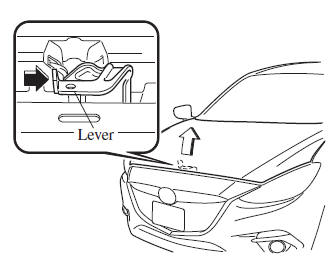
NOTE The lever is located a little to the left of center when facing the vehicle.
- Grasp the support rod in the padded area and secure it in the support rod hole indicated by the arrow to hold the hood open.
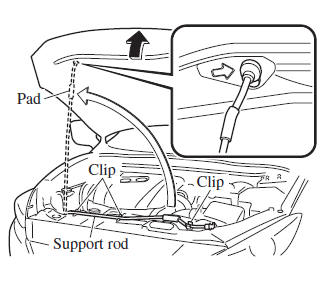
 Hood
Hood
WARNING
Always check that the hood is closed
and securely locked:
A hood that is not closed and securely
locked is dangerous as it could fl y open
while the vehicle is moving and ...
 Closing the Hood
Check under the hood area to make
certain all filler caps are in place and all
loose items (e.g. tools, oil containers,
etc.) have been removed.
Lift the hood, grasp the padded area on
th ...
Other materials:
PID/Data Monitor Inspection [Blind Spot Monitoring (Bsm)]
1. Connect the M-MDS (IDS) to the DLC-2.
2. After the vehicle is identified, select the following items from the initialization
screen of the IDS.
a. Select “DataLogger”.
b. Select “Modules”.
c. Select “BSML” or “BSMR”.
3. Select the applicable PID from the PID table. ...
Brake Assist
During emergency braking situations
when it is necessary to depress the brake
pedal with greater force, the brake assist
system provides braking assistance, thus
enhancing braking performance.
When the brake pedal is depressed hard or
depressed more quickly, the brakes apply
more firmly.
N ...
Manual Transaxle Removal/Installation [G66 M R]
CAUTION:
Secure the steering wheel using tape or a cable to prevent the steering shaft
from rotating after disconnecting the steering shaft. If the steering wheel
rotates after the steering shaft and the steering gear and linkage are disconnected,
the internal parts of the clock spr ...
