
Mazda 3 Service Manual: Coil Antenna Removal/Installation
1. Disconnect the negative battery cable..
2. Remove the column cover..
3. Remove the key cylinder..
4. Disconnect the coil antenna connector.
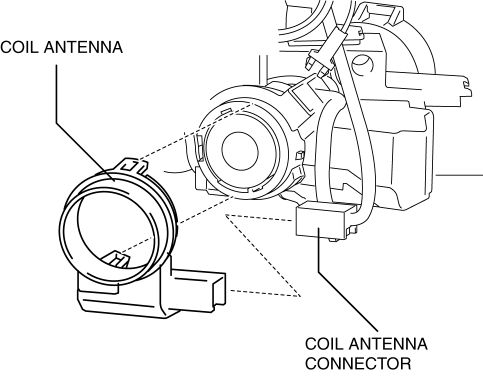
5. Remove the screw.
6. Detach the coil antenna hooks and remove the coil antenna from the steering lock.
7. Install in the reverse order of removal.
 Center Roof Antenna Removal/Installation
4SD
1. Disconnect the negative battery cable..
2. Remove the rain sensor cover. (Vehicles with auto light/wiper system).
3. Disconnect the rain sensor connector. (Vehicles with auto light/wiper s ...
 Confirmation Step 3: Antenna System Simple Inspection [Radio]
Because the antenna system is equipped with a capacitor, the continuity cannot
be checked. Therefore proceed the following simple inspection.
Turn the AM radio on.
Tun ...
Other materials:
Starter Inspection [Mzr 2.0, Mzr 2.5]
On-vehicle Inspection
1. Verify that the battery is fully charged.
2. The starter is normal if it rotates smoothly and without any noise when the
engine is cranked.
If the starter does not operate, inspect the following:
Remove the starter, and inspect the starter unit.
...
Car Navigation Unit
Purpose
Reads the SD card data inserted into the car-navigation unit and sends the
read data to the audio unit.
Function
The car-navigation unit has the following functions:
TomTom Home
By connecting the SD card to your computer at home, the map data or software ...
Front ABS Wheel Speed Sensor Inspection
Sensor Output Value Inspection
CAUTION:
Resistance inspection using other testers may cause damage to the ABS wheel-speed
sensor internal circuit. Be sure to use the M-MDS to inspect the ABS wheel-speed
sensor.
1. Switch the ignition to off.
2. Connect the M-MDS to the DLC-2. ...
